A menu that makes guests hungry
Choose a size, add extras and discover matching recommendations in the cart. Make your menu a tool for additional sales.
Already included in Pronto. Available with Classico too.
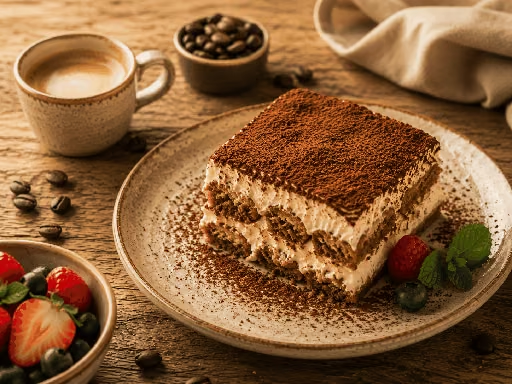
Goes well with: coffee with dessert
A tiramisu is already in the cart. Under “Goes well with”, guests discover an espresso for €2.60 or a cappuccino for €3.80. Matching additions appear just as guests review their order.
Menu, variants & extras for your direct orders
Guests customise their dish with variants, extras and ingredients they can leave out. In the cart, they discover additions that suit their meal before placing the order. Your digital menu can help encourage additional sales.
The right size. An extra you fancy.
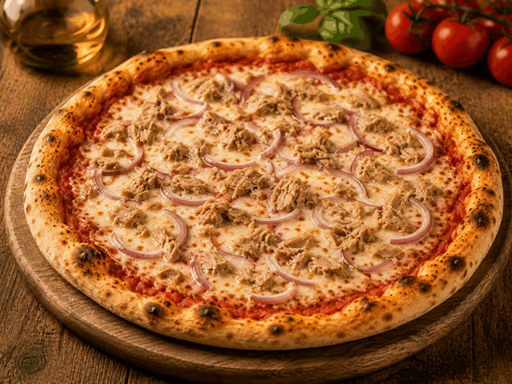
For Pizza Tonno e Cipolla, guests choose their size, add extra mozzarella and can leave out red onions. The extra is reflected in the price: €12.90 for the medium pizza plus €1.50 for the extra makes €14.40.
Show available additions just as guests put their dish together. Individual preferences remain part of the same selection.
One dish, several variants
A small portion for lunch or a large pizza to share: variants make the different versions of a dish easy to understand. Guests choose the size on the dish itself, instead of comparing similar entries across your menu. All variants stay together, making them easy to compare.
- Offer dishes in different sizes or versions
- Assign variants to the relevant dish
- Use clear option names, such as Small, Medium or Large
Offer extras and let guests leave out ingredients
Extra cheese, a dip or another topping: extras show guests what they can add to their dish. Letting them leave out ingredients caters for personal preferences, such as “no onions”. Both options are part of choosing the dish. Guests see the options you have provided, and your team receives their choices with the order.
- Create suitable extras for each dish
- Choose which ingredients guests can leave out
- Include additions and changes in the order
“Goes well with”: recommendations in the cart
Recommendations reach guests where they review their order: in the cart. Under “Goes well with”, they discover additions that suit their selection. Guests can find a salad, drink or dessert for their meal without searching through the whole menu again. Alongside extras on the dish, they discover other items that complement their order.
Already included in Pronto
Variants, extras, ingredient removal and recommendations are already included in Pronto. Classico includes them too. You do not need a higher plan for these features; the payment distinction remains: with Pronto, guests pay when they receive their order, while Classico also lets them pay online.
Included in the Pronto plan
Menu, variants & extras: included with Pronto at €29 per month plus VAT. Classico includes all Pronto features.
With Pronto, guests pay on collection or delivery. Classico adds online payments, your own domain and ordering directly at the table.
All prices per month plus statutory VAT. Both plans can be cancelled monthly. No Ordentino commission per order.
Compare all features and costsTry either plan free for 30 days - from the day you go live.
No obligation to subscribe. No automatic paid renewal.
We set up your menu for you.
- Google and Instagram links included.
- A ready-to-use QR code for your flyers.
Then from €29 / month plus VAT - only if you want to continue.
Payment provider fees and other external costs may also apply during the trial.
Frequently asked questions: Menu, variants & extras
Are variants and extras already included in Pronto?
Yes. With Pronto, you can create variants and extras, let guests leave out ingredients and recommend matching dishes. All these features are also included in Classico.
Can guests choose an option such as “no onions”?
Yes. You can make ingredients optional on a dish. Guests can then choose “no onions”, for example, if you have enabled that option for the dish.
What is the difference between extras and recommendations?
An extra adds to the selected dish, such as extra cheese. Recommendations under “Goes well with” in the cart suggest other suitable dishes or drinks. Guests can add to their meal as they review their selection before ordering.
Do I need online payments for these features?
No. Guests can choose variants, extras and recommendations with Pronto and pay on collection or delivery.
Do I have to enter my menu myself?
Send us your existing menu as a PDF, photo or link. We handle the initial setup for you. You check and approve all information before activation. Afterwards, you can change dishes, prices, pictures and settings yourself at any time.
When do the 30 free days begin?
Try Pronto or Classico for 30 calendar days with real orders in your restaurant. The period starts only when your public ordering page is actually activated. Sending an enquiry, creating an account and setting up the menu do not start the clock. No paid subscription begins afterwards without your express consent.
What happens after the 30 days?
You decide whether to continue with a paid Ordentino plan. No paid subscription begins without your express consent. There is no obligation to book a paid period after the trial.
Do I get links for Google and Instagram?
We provide links for the menu and collection in your Google Business Profile, delivery if you offer it, and your Instagram profile. You publish the links as the profile owner; we help you use them.
Do I get a QR code for my flyers?
You receive a ready-to-use QR code for your ordering page, for flyers, packaging or the counter. This promotional QR code is included in both plans. QR codes for ordering at individual tables are a separate Classico feature.
Is the initial menu setup free?
Yes. Initial menu setup is included in Pronto and Classico without an additional setup fee. You provide your existing information and check the result before publication. Your restaurant remains responsible for the accuracy of the information.
Try free for 30 days
Your enquiry comes with no obligation. We will contact you personally, discuss your menu and prepare your free start.
Try Pronto or Classico for 30 calendar days with real orders in your restaurant. The period starts only when your public ordering page is actually activated. Sending an enquiry, creating an account and setting up the menu do not start the clock. No paid subscription begins afterwards without your express consent.
Payment provider fees and other external costs may also apply during the trial.
JavaScript must be enabled to use the form. You can also contact us by email or phone.
Prefer to contact us directly?